01 · intake
A question lands
Live chat, email, and Discord land in one operator queue — one conversation model, no lost threads, no tab-switching.
inbox · all channels
Woes pulls live chat, email, and Discord into one inbox — with an AI agent that answers from your docs and API, cites every source, and hands off to a human the moment it should.
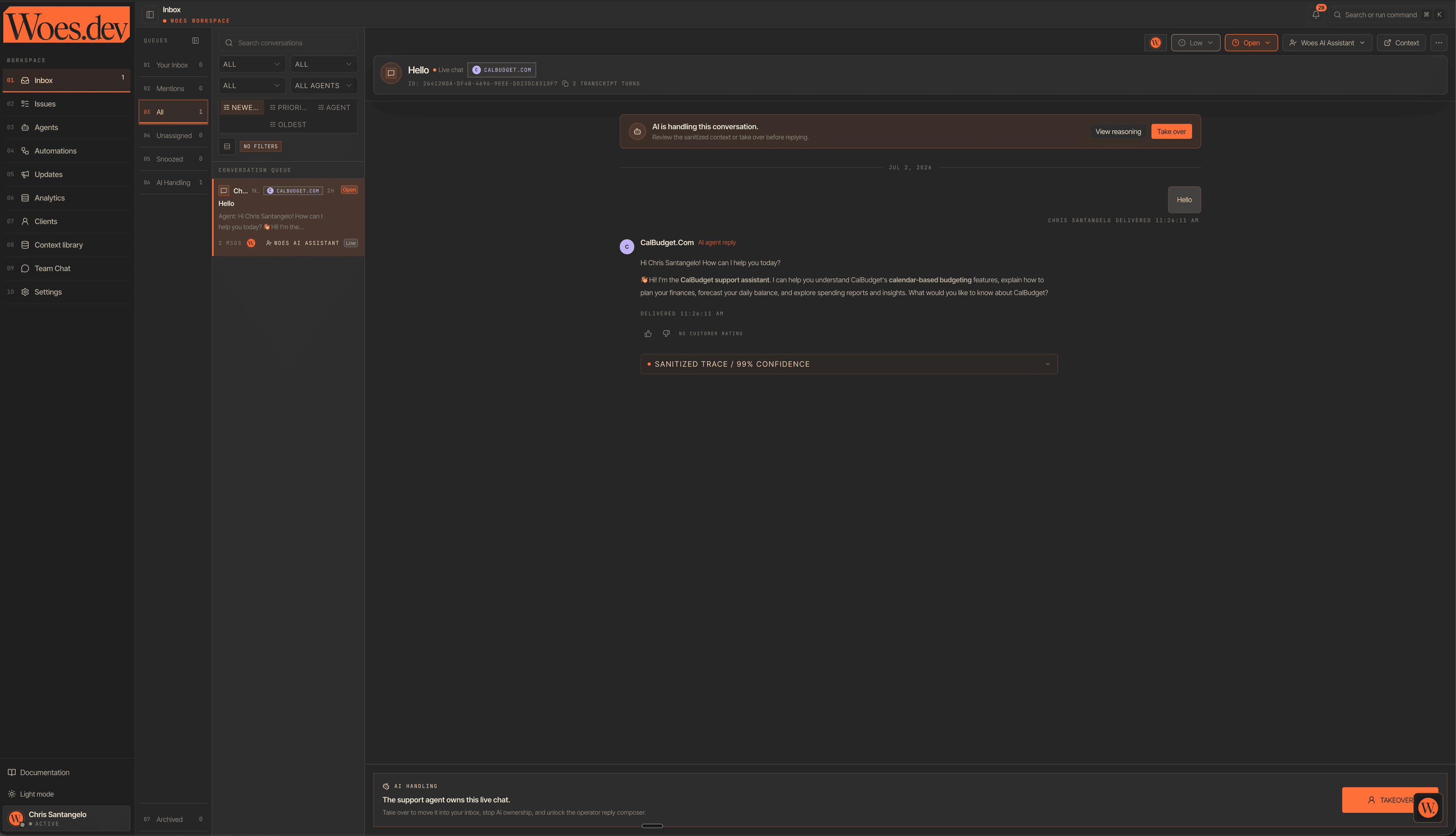
This is the live Woes workspace — the agent owns the first reply, operators see the sanitized trace, takeover stays one click away.
Generic help desks read your docs. Woes runs them.
When workspace evidence is sufficient, Woes answers from your ingested docs and API context with source citations. When context is missing or confidence is low, it asks a focused question or hands the conversation to a human. Guarded live checks are available when credentials and route rules allow them.
Live chat, email, and Discord land in one operator queue — one conversation model, no lost threads, no tab-switching.
The agent answers only from your ingested docs and API context — crawled, chunked, and embedded, scoped to your workspace. Nothing invented.
Every reply cites its sources. When credentials and route rules allow, Woes runs a guarded live check against your real API before it hits send.
When confidence is low, the agent asks a clarifying question or hands off with full context. Operators take over in one click, and CSAT surveys close the loop.
One workspace for every channel, every customer, and every answer — an agent that cites its sources, runs guarded live checks, and hands off when evidence is missing.
Install the Woes CLI, approve login in the browser, then triage inbox conversations, inspect issues, review clients, and script public REST API workflows without leaving your terminal.
No migration project, no professional-services quote. Three steps between your docs and a help desk that answers with proof.
Add your OpenAPI spec or docs URL. Woes ingests, chunks, and embeds every endpoint into workspace-scoped context.
Drop the widget on your site and connect email and Discord. Every thread lands in one operator inbox.
The agent answers with citations from your context, can run guarded live checks when configured, and hands off when unsure.
Every plan includes the Woes inbox, API-aware live chat, grounded AI support, and documentation ingestion. Start with a 14-day trial, then scale with seat-based plans, included capacity, and AI outcomes priced below the usual help-desk AI outcome model.
For small API teams launching real support workflows.
A low-friction starting point for one product or docs set.
For growing teams supporting customers across channels.
For teams splitting support by product, workflow, or audience.
For multi-product API companies with higher volume.
For high-volume teams with stronger reporting and controls.
Scale capacity with customer-managed AI provider keys.
Use your own provider key while Woes keeps the support workflow intact.
Built around committed usage, security review, and onboarding. Custom seat terms, AI outcome commit, AI-agent capacity, and limits — with SSO/SAML, audit logs, retention controls, and dedicated onboarding.
Only customer-facing AI conversations that Woes answers and resolves are billable. Clarifying questions, handoffs, failed attempts, and simple greetings are not counted as AI outcomes.
Seats are the human teammates working the inbox and are billed per seat. AI agents and widgets are included by plan tier, with simple add-ons when another product or workflow needs its own agent.
Each plan includes API source ingestion, endpoint indexing, live API checks, and public REST API calls so pricing tracks the real API support surface.
Add seats when more human teammates need to work the inbox. Add AI agents when another product, docs set, website, or support workflow needs its own widget.
| Feature | Starter | Growth | Scale | Private AI |
|---|---|---|---|---|
| Team and API capacity | ||||
| Seat price | $29 | $59 | $99 | $8 |
| Seat capacity | Seat-based | Seat-based | Seat-based | Seat-based |
| AI agents + widgets | 1 | 3 | 10 | 10 |
| Additional AI agents | $25 / agent | $20 / agent | $15 / agent | $15 / agent |
| API sources | 3 | 15 | 50 | 50 |
| Indexed endpoints | 500 | 5,000 | 25,000 | 25,000 |
| AI and API usage | ||||
| Included AI outcomes | 100 / mo | 500 / mo | 2,000 / mo | Provider-billed |
| After included AI outcomes | Upgrade required | Upgrade required | Upgrade required | Provider-billed |
| Live API checks | 100 / mo | 1k / mo | 10k / mo | 10k / mo |
| Public API calls | 5k / mo | 50k / mo | 250k / mo | 250k / mo |
| Public REST API | Included | Included | Included | Included |
| Support workflow | ||||
| Live chat | Included | Included | Included | Included |
| Email support | Included | Included | Included | Included |
| Discord support | Included | Included | Included | Included |
| CSAT and NPS surveys | Basic | Included | Advanced | Advanced |
| Automations | Basic | Included | Advanced | Advanced |
| Analytics | Core | Full | Advanced | Advanced |
| Client portal | - | - | Included | Included |
| SSO, audit logs, retention | - | - | - | Enterprise |
Grounded answers, on the marketing page too. Anything else — ask us in the live chat widget on this page, or email hello@woes.dev.
Only customer-facing AI conversations that Woes answers and resolves are billable. Clarifying questions, handoffs to your team, failed attempts, and simple greetings are never counted.
It asks a clarifying question or hands the thread to a human operator with full context. The agent only answers from your ingested API context — it never invents endpoints, fields, or behavior.
Point Woes at an OpenAPI spec or documentation site. It crawls, parses, and chunks the content, then embeds it into context that is scoped to your workspace and cited in every answer.
Credentials are stored separately from source content, encrypted at rest, redacted before any model call, and never returned in plaintext — to you, your customers, or the model.
Yes. The Private AI plan lets you connect your own OpenAI, Anthropic, or Google key for $8/seat/month. Woes keeps provider keys encrypted and server-side, and your model usage is billed directly by your provider instead of marked up by Woes.
Live chat via an embeddable widget, email, and Discord — all flowing into one conversation model and one operator inbox, on every plan.
Create your workspace today and give your customers support that answers from evidence, checks live APIs when configured, and hands off when it needs a human.
Create your workspace